You already know Excel. The cells do what you tell them, the formulas work, and the price is hard to beat - it came on the laptop you already own.
That's why most contractors still run their bids through a spreadsheet. Industry adoption data shows 66% of mid-to-large construction firms have moved to cloud estimating software (Global Growth Insights, 2026). Flip that over and the small-contractor market - solo operators, two-truck shops, the guy pricing a job from his truck - is still mostly on Excel. Our read of those adoption numbers puts the share of contractors still primarily on spreadsheets at roughly two-thirds.
Here's the deal: Excel isn't the wrong call for everyone. But for a lot of crews it's quietly eating margin in ways that never show up on the sheet itself. Slow bids, missed line items, double entry, profit you can't actually see.
This guide breaks down why Excel sticks around, what it's really costing you per year, and the crew-size breakpoint where dedicated estimating software starts paying for itself.
Let's break this down.
The 67% Reality: Why Excel Still Runs the Trade
Excel doesn't win on features. It wins on friction. You already own it, you already know it, and you can build a takeoff sheet in an afternoon without watching a single tutorial.
That low bar matters when 42% of construction firms cite cost as the main barrier to adopting estimating software, and 20% of small contractors point to digital-literacy gaps and training as the hurdle (Global Growth Insights, 2026).
When the alternative is a paid tool you have to learn, "I'll just fix the spreadsheet" is the path of least resistance. It feels free. It feels safe.
And for a lot of solo operators, it genuinely is fine. If you bid a handful of jobs a month and you're the only person touching the file, Excel does the job.
There's a reason the construction estimating software market is only $2.07 billion in 2026 against a $2.23 trillion US construction industry (Global Growth Insights; US Census Bureau, 2026). Most of the money in this trade still moves without dedicated software touching it.
But here's what most people miss. "Free" and "no cost" aren't the same thing. Excel doesn't charge you a monthly fee, but it does charge you in time, in missed line items, and in bids you lose because you were still typing when the other guy already sent his number.
Those costs don't live in a cell. They live in the jobs you didn't win and the margin you didn't catch.
So the question isn't "is Excel bad." It isn't. The question is whether the hidden cost is still small enough to ignore - and that depends on your crew size and how many bids you send a week.
The Hidden Costs Hiding in Your Spreadsheet
These are the costs that never make it onto your profit-and-loss statement. You feel them, but you can't point at a row and say "there, that's the Excel tax."
You lose bids by being second. When a homeowner asks three contractors for a quote, the first one back has the edge.
Lead-response research from Harvard Business Review found firms that contact a lead within an hour are roughly 7 times more likely to qualify it than those who wait even one more hour - and 60 times more likely than firms that wait past 24 hours (HBR, 2011; qualify rate, not close rate).
If your Excel estimate takes a day and a half to finish, you're not just working slowly. You're showing up late to a race that's already over.
Takeoff misses eat your profit. This is the big one. Counting materials by hand in a spreadsheet is structurally prone to missing the small stuff - fasteners, sealants, insulation, cleanup, disposal.
Across contractor communities, missed takeoff line items come up again and again as the quiet profit killer. A few hundred dollars here and there across a job and the margin is gone before you ever invoice. Dedicated takeoff tools like STACK Construction cut that miss rate hard - assemblies bundle the small stuff into the measurement itself instead of leaving it to your memory.
You do everything twice. Your Excel sheet doesn't talk to QuickBooks. So you type the estimate into the spreadsheet, then you type the same numbers into your accounting software when the job closes.
Double entry isn't just boring - it's where typos become billing errors, and where a dropped zero turns into a $4,000 mistake nobody catches until the job is done.
You can't actually see your profit. Net profit margins in construction typically run 3% to 7% (CNBA, 2026). On a $50,000 job, that's $1,500 to $3,500 of actual take-home.
A single missed line item or a bad labor guess can wipe that out and you won't know until the job closes. The spreadsheet tells you what you estimated. It doesn't tell you what you actually made until it's too late to fix it.
Nobody else can work your file. The spreadsheet lives on your laptop, built in your head, with tabs only you understand. If your estimator or office manager needs to build a bid while you're on a roof, they're starting from scratch. You can't grow a crew on a file only one person can read.
You have no history to learn from. Every bid starts from zero because your old estimates aren't searchable. Yet contractors who keep a historical cost database and compare actual vs. estimated costs consistently tighten their bid accuracy over time (BuiltSimple, 2025).
Excel can store that data, but in practice nobody builds the dashboard. So you keep guessing the same way year after year.
What Excel Actually Costs You Per Year
Here's the part no pricing page will show you. Let's put real numbers on the Excel tax, then compare it to what dedicated software costs.
In our testing, building a residential estimate took 30 to 45 minutes by hand in a spreadsheet - against 8 to 11 minutes in dedicated estimating software. That matches the broader data: contractors using digital estimating tools report 15% faster bid preparation (Global Growth Insights, 2026).
We pull the numbers behind these benchmarks - market size, overrun rates, adoption trends - into our full 2026 construction estimating statistics.
Say you're a solo contractor sending 8 bids a week. Here's what that time is worth at a typical burdened billing rate of $75 an hour:
| Method | Time per bid | Bids/week | Hours/week | At $75/hr | Annual cost |
|---|---|---|---|---|---|
| Excel | 38 min (avg) | 8 | 5.1 hrs | $381/wk | $19,800/yr |
| Estimating software | 10 min (avg) | 8 | 1.3 hrs | $100/wk | $5,200/yr |
| Difference | 3.8 hrs/wk | $281/wk | $14,600/yr |
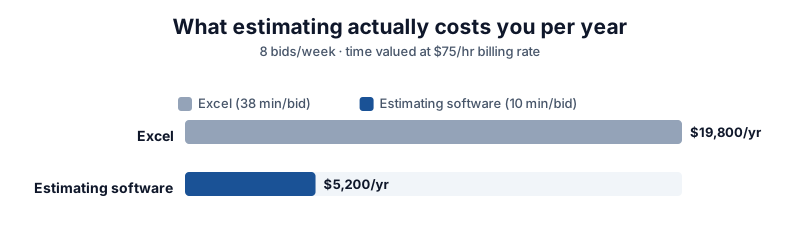
Read that last row twice. The time Excel costs you is worth roughly $14,600 a year at solo-operator billing rates - and that's before you count the bids you lost by being slow, or the line items you missed.
Now subtract the software cost. Clear Estimates runs $59 a month, or $708 a year. Projul runs $399 a month flat, or $4,788 a year.
Even the more expensive option leaves you ahead by nearly $10,000 a year on time alone - again, before the wins you pick up from faster bids and fewer misses.
Bottom line: the spreadsheet feels free because there's no invoice for it. But your time has a billing rate, and Excel spends it freely. If you send more than a few bids a week, the math is already running against you.
When Excel Is Still the Right Tool
None of this means you should rush out and buy software tomorrow. Excel genuinely is the right call for some contractors, and saying otherwise is just sales talk.
Stick with Excel if you're a solo operator doing fewer than 5 estimates a month, your jobs are similar enough that you're mostly copying an old sheet, and you don't feel the pain of slow bids.
If you bid two roof replacements a month and you win one, the spreadsheet is fine. The hidden cost is real but small, and $708 a year for software you'd barely use is money poorly spent.
The same goes if your jobs are simple and repeatable - one trade, one material list, one labor pattern. A roofer who bids the same asphalt-shingle swap week in and week out doesn't need a $400-a-month platform. He needs a clean template, and Excel handles that.
If that's you, the free calculators on our site cover the takeoff math without a subscription. The roof area calculator and concrete calculator handle the counting so you can skip the manual math.
Signs It's Time to Switch
Excel stops being the right tool at a specific point, and it's usually about growth, not features.
You're losing bids on speed. If customers keep telling you "we already went with someone else" before your estimate even lands, your bottleneck is turnaround, not pricing. That's the clearest signal.
You've added a second estimator. The moment two people need to touch a bid, a single-user spreadsheet breaks down. Version control becomes a nightmare. Someone's working off last week's file. This is where teams start losing real money to confusion.
You're missing line items you only find mid-job. If you keep getting to the job site and realizing you didn't budget for something - a rusted line set, an extra sheet of plywood, a disposal run - your takeoff process has a hole. Spreadsheets don't close that hole. A pre-priced material library does.
You can't tell which jobs made money. If you finish a month and genuinely don't know which bids were profitable, you've outgrown Excel. The fix isn't a better spreadsheet. It's job costing, and that lives in estimating software.
Estimating errors are eating your margin. Estimating errors are the single largest root cause of cost overruns - 32% of them, per KPMG and CNBA data (2026). If your overruns keep tracing back to the original bid, the spreadsheet is where the leak starts.
The Alternatives, Picked by Crew Size
There's no single "best" tool here - it depends entirely on how many bids you send and how many people touch them. Here's how we'd pick.
Solo operator, under 5 bids a month: Clear Estimates at $59 a month. It's estimating only - no scheduling, no accounting, no mobile app - but that's the point.
It cranked out a residential estimate in 8 minutes in our test, against 30-plus minutes by hand. If all you need is faster, cleaner bids, this is the cheapest tool that does it well.
The catch: the base plan is a single user, and it's desktop-only. See our Clear Estimates review for the full breakdown.
Trade crew of 2 to 10 techs: Projul at $399 a month, flat. No per-user fees. If you've got 5 techs, you pay the same as a solo operator, and that's easily $200 a month cheaper than tools that charge per head.
In our test it built a full estimate in 11 minutes. The catch: the $399 Core plan doesn't include QuickBooks sync or job costing - you need Core+ at $599 for those. See our Projul review or the best estimating software ranking.
Commercial work from PDF blueprints: STACK, which does digital takeoffs better than anything else here. Just know the per-user pricing stacks - 5 users and you're around $11,000 a year. Only go here if plan markup is your daily workflow.
Not sure which fits: Take our 5-question quiz - it sorts you by crew size and trade in about a minute. You can also compare the real cost by team size with our software cost calculator.
One honest note before you switch. Moving off Excel means rebuilding your templates, re-importing your contacts, and retraining whoever touches the bids.
That switching cost is real and it's a week or two of pain. The math above says you earn it back fast - but go in with eyes open, not expecting day one to feel easy.
If you're an electrician, our Excel-to-software switch guide for electrical contractors walks the 5-step migration and the four failure points specific to electrical work.
For the full estimating workflow that works the same whether you're in Excel or software, our step-by-step HVAC estimate guide walks through the 7 steps from load calc to change orders.
Frequently Asked Questions
What percentage of contractors use Excel for estimating?
Industry adoption data shows 66% of mid-to-large construction firms have moved to cloud estimating software as of 2026 (Global Growth Insights). The small-contractor market - solo operators and crews under 10 - adopts at a much lower rate, which leaves roughly two-thirds of contractors still primarily using spreadsheets or paper for estimates.
The exact figure varies by survey and crew-size cutoff, but the pattern is consistent: the smaller the shop, the more likely it runs on Excel.
How much time does estimating software save over Excel?
In our testing, a residential estimate took 30 to 45 minutes by hand in a spreadsheet, against 8 to 11 minutes in dedicated estimating software. That lines up with industry data showing contractors using digital tools report 15% faster bid preparation (Global Growth Insights, 2026).
For a solo contractor sending 8 bids a week, that time is worth roughly $14,000 a year at a $75 burdened billing rate.
When should I switch from Excel to estimating software?
Switch when Excel's hidden costs start exceeding the software's price - usually around 5 or more estimates a week, or the moment a second person needs to touch your bids.
Other clear signs: you're losing bids on speed, you keep missing line items you only find mid-job, or you can't tell which jobs were profitable at month's end. If you're a solo operator doing under 5 estimates a month with repeatable job types, Excel is still the right call.
Is Excel actually bad for construction estimating?
No. Excel is a perfectly good tool for solo contractors doing a few similar jobs a month. It's free, familiar, and flexible. The problem isn't that Excel is bad - it's that its costs are hidden.
You don't get an invoice for the time it takes, the bids you lose by being slow, or the line items you miss. Those costs are real but invisible, and they grow with your crew size and bid volume. Excel stops scaling before it stops working.
How much does estimating software cost?
Dedicated estimating software ranges from about $59 a month for solo tools like Clear Estimates to $399 a month flat for team tools like Projul. Per-user tools like STACK can run $2,500 to $11,000 a year depending on crew size.
The real comparison isn't the monthly fee - it's the fee plus the time Excel costs you. For most contractors sending more than a few bids a week, software pays for itself on time saved alone. See our software cost calculator for the math by crew size.
Will switching to estimating software fix my cost overruns?
Partly. Estimating errors are the single largest root cause of cost overruns - 32% of them, per KPMG and CNBA data (2026). Estimating software cuts those errors with pre-priced material libraries and templates that don't let you skip a line item.
But the other 68% of overruns come from scope creep, material price swings, and procurement issues - and software only helps with those if you actually use the job-costing and change-order features. The tool fixes the estimating half. You still have to run the job.
Disclaimer: Cost and time figures are 2026 national ranges from public sources (Global Growth Insights, KPMG, CNBA, US Census Bureau, BLS, BuiltSimple) and our own testing, and they vary by trade, region, and job conditions. Software pricing is as of August 2026 - always confirm current rates on the vendor's site. Project names and trademarks belong to their respective owners; EstimatorSuite is independent and not affiliated with or endorsed by any tool mentioned. Nothing here is financial, legal, or tax advice.