Your estimating probably lives in Excel. One tab for device counts, one for wire runs, one for the markup formula you built in 2019 and haven't touched since.
For a solo electrician quoting four service calls a week, that's fine. But at $85 an hour of your own billing time, four bids a week done by hand costs you roughly $11,800 a year - and that's before a single missed line item.
This guide gives you three things: the four places Excel breaks on electrical work specifically, a cost table by crew size so you can see your breakpoint in dollars, and a 5-step switch plan that won't eat a week of billable time.
Here's the short version: if you bid more than 5 jobs a week or a second person needs to touch your estimates, switch. If you're solo and under 5 estimates a month, Excel is still defensible - and I'll say exactly when below.
Let's dig in.
What Makes Electrical Estimates Different
Electrical estimating isn't a generic materials list. The structure of the work is what decides which tool survives.
It's device counting. A 1,800 sq ft rewire means tallying 40+ circuits, 150+ devices, breaker sizes by circuit, and feet of wire by gauge. Roofers estimate in squares. You estimate in individual boxes, plates, and breakers.
Every circuit is a mini-cost-unit. Wire gauge, breaker, box, plate, connectors, and labor minutes repeat circuit after circuit. That repetition is exactly what estimating software's assemblies are built for - and exactly what a copy-paste spreadsheet handles badly.
Code items hide in the margins. GFCI protection in kitchens, baths, and outdoors. AFCI now covering most habitable rooms under the 2020/2023 NEC cycle. Smoke and CO interconnects. Miss one and the inspector sends you back.
You price in two phases. Rough-in and trim-out get scheduled and invoiced separately, often weeks apart. Your estimate has to carry both phases without double-counting material.
That last point matters more than most electricians realize. But here's the thing:
Each of these four structures is a place where Excel doesn't just slow you down - it fails in a specific, expensive way. Here's where it gets interesting: none of these are "Excel is old" complaints. They're structural mismatches between the tool and the trade.
The 4 Places Excel Breaks for Electrical Work
1. Circuit counting by hand
Counting devices off a printout is slow, and it's where errors breed. Contractor communities bring this up constantly: an apprentice counts a floor wrong, the wire order comes up short, and now someone's making a second run to the supply house while the job slips a day.
The math hurts twice. You pay for the extra wire run in labor, and you pay again in schedule slip. On a job where you quoted $6,800, one miscounted floor can turn a good week into a breakeven one.
Digital takeoff tools count from the PDF directly. STACK, for example, counts outlets, conduit runs, and panel circuits straight from the drawing, and the quantities flow into the estimate without a retype step. We'll come back to when that's worth paying for.
2. Code items don't announce themselves
Your Excel template was built from your last job, which was built from the one before that. GFCI requirements, AFCI coverage, and interconnect rules have all expanded over recent NEC cycles.
Translation: a template that was compliant in 2019 quietly produces non-compliant bids in 2026.
Miss an AFCI on a bedroom circuit and the correction isn't a $60 device. It's a return trip, a re-inspection fee, and a delay the GC logs against you. On tight residential margins, one missed code item per three jobs is the difference between a profit and a wash.
Spreadsheet templates don't warn you. A maintained assembly library does - when the code item changes, you update the assembly once and every future bid picks it up.
3. Revisions don't propagate
The GC calls Wednesday: add three circuits to the shop area, revised bid by Thursday.
In Excel, that means touching the device tab, the wire tab, the labor tab, and the summary - and praying all four stay consistent. Electrical contractors describe exactly this as a stack of tabs and hope.
In estimating software, you add the circuits to the takeoff or the assembly, and quantities, pricing, and totals update from one source. The revision that costs an evening in Excel costs 20 minutes in a tool built for it.
And speed matters here. Research from Harvard Business Review found firms that respond to a lead within an hour are about 7x more likely to qualify it than those who wait just one more hour. A revision you can't turn around fast is a bid you lose - or worse, a number you rush and get wrong.
4. Copper moves faster than your spreadsheet
Wire and conduit pricing tracks copper and aluminum, and both have been volatile through 2025-2026. NECA has flagged commodity swings and long equipment lead times as ongoing cost pressures for electrical contractors all year (ECMag, early 2026, citing NECA).
A static price list inside a workbook drifts from reality the day you save it. If your #12 Romex price is three months old, every circuit on your sheet is priced on fiction.
Now put that against your margin. The median net margin for electrical contractors runs about 5-6% (NECA Financial Performance Report). On a $50,000 job, that's $2,500 to $3,000 of take-home. A 4% pricing error from a stale copper price wipes out the whole job.
Estimating software doesn't predict copper. But it keeps one live price table that you update in one place, instead of nine workbooks updated in nine places - or not at all.
What the Switch Costs by Crew Size
Here's the part no vendor's pricing page will show you: what Excel itself costs, at electrical billing rates.
First, the assumptions, so you can adjust them to your shop:
- $85/hour. That's the conservative floor of the $75-$200/hour range electricians typically bill clients - the rate that carries overhead, insurance, and licensing on top of wages. (That client rate is a different animal from the BLS wage data: the median employed electrician earns $29.61/hour, BLS OEWS May 2023, SOC 47-2111. You're not pricing your estimating time at wage rates; you're pricing it at what that hour could have billed.)
- 40 minutes per estimate in Excel. Our testing across trades puts a hand-built estimate at 30-45 minutes. Electrical's device-counting overhead pushes that up, so 40 is fair, not padded.
- 12 minutes in software. Our general benchmark is 8-11 minutes; one extra minute for electrical's takeoff detail.
Run those at four typical electrical setups:
| Setup | Bids/wk | Excel time cost/yr | Software time cost/yr | Software price/yr | Net gain |
|---|---|---|---|---|---|
| Solo electrician | 4 | ~$11,800 | ~$3,500 | $708 (Clear Estimates) | ~$7,600 |
| 3-person crew | 8 | ~$23,600 | ~$7,100 | $2,868 (JobTread, 3 users) | ~$13,600 |
| 8-person crew | 10 | ~$29,500 | ~$8,800 | $4,068 (JobTread, 8 users) | ~$16,600 |
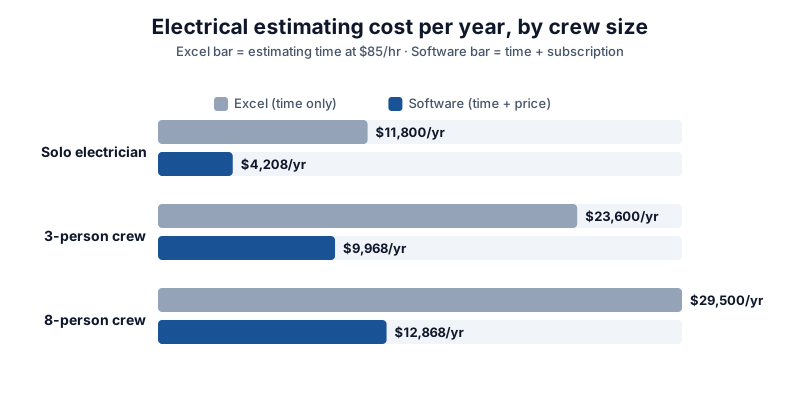
These are our estimates built on the stated assumptions, not vendor claims. JobTread pricing reflects the July 2026 update ($199/mo base plus $20/user); Clear Estimates is $59/mo annual.
Read the solo row twice. Even a one-truck operation leaves roughly $7,600 a year on the table in time alone - before counting the bids lost by being slow, or the code items missed.
But the table also shows where the switch is NOT worth it yet, which brings us to the honest section.
When Excel Is Still the Right Call
Saying every electrician needs software would be sales talk. Here's who should keep the spreadsheet:
You're solo and under 5 estimates a month. At that volume the time cost is real but small, and $708 a year for a tool you'd open twice a week is money spent badly.
Your work repeats. If most weeks are the same panel swaps and service calls, your template already knows the job. You're mostly changing a date and an address.
Nobody else touches the file. The two-person version-control problem - whose copy is current - hasn't hit you yet.
If that's you, close this tab and keep working. Excel's hidden costs show up at volume, and you're not there yet. The free calculators on our site handle the per-job math - wire fill, load, conduit sizing - without a subscription.
For the full picture of what Excel costs across all trades - not just electrical - our guide on why contractors still use Excel for estimating breaks down the hidden costs line by line.
If your volume has crossed 5 bids a week, or your apprentice now builds the first draft of every estimate, keep reading. The switch is cheaper than you think if you sequence it right.
How to Switch in 5 Steps Without Losing a Week
Most failed switches die the same way: someone tries to rebuild two years of spreadsheets in one weekend, burns out, and crawls back to Excel. Don't migrate everything. Migrate one job, well.
Step 1: Pick your best recent job and rebuild only that. Not your biggest job - your cleanest one. The rewire or panel upgrade you've done a dozen times, where you know the material list cold. That becomes your template foundation. Or skip the blank page entirely: our free electrical estimate template already has the panel, rough-in, devices, and permit rows built in.
Step 2: Build assemblies, not line items. This is the step that pays for the whole project. Take your repeated chunks and save them as reusable groups: a receptacle circuit (device + box + plate + wire + labor), a lighting circuit, a panel upgrade with permit and load-calc line items. Next bid, you add circuits in seconds instead of rows.
Step 3: Refresh pricing once, on purpose. Pull current prices from your supplier for everything in those assemblies. This is the painful hour - and the last time you'll do it from scratch. After this, price maintenance is a monthly 10-minute task, not a rebuild.
Step 4: Run one real job in parallel. Bid the next similar job twice: once in Excel like you always have, once in the software. Compare the two numbers and, more importantly, the time. Expect the software version to take longer the first time. Expect it to win by week two.
Step 5: Keep your history. Import last year's bids if the tool allows it, and start recording what jobs actually cost against what you estimated. Contractors who track estimated-vs-actual tighten their pricing every year; contractors who don't, guess the same way forever.
Two practical warnings from contractors who've done this: don't start the switch mid-season, and don't skip step 4. The parallel bid is what makes you trust the tool before your money depends on it.
Which Software Fits Your Electrical Business
The right pick depends on what kind of electrical work you bid. Here's the honest breakdown:
Solo electrician, residential service and repair: Clear Estimates at $59/month. It's estimating only - no scheduling, no dispatch - and its residential templates cover common service work. You'll be building estimates between jobs, not fighting a platform built for 50-person firms. See our Clear Estimates review for the full picture.
2-8 person crew, residential plus light commercial: JobTread at $199/month base plus $20/user. The built-in accounting replaces a QuickBooks subscription, which is why it's our value pick for electrical crews. Watch the per-user fee as you grow - at 8 users you're at $4,068/year, still well under what the time math says you're saving.
Commercial work bid from blueprints: STACK. If your bids start as PDF plans, on-screen takeoff is the whole game - counting outlets, conduit runs, and panel circuits from the drawing instead of a printout. Just know the per-user pricing stacks up: 5 users runs about $11,000/year. Only worth it if plan takeoffs are your daily workflow.
Not sure which fits: our best electrical estimating software ranking compares all of them on pricing, pros and cons, and electrical-specific fit - or run your own numbers with the software cost calculator, or take the 5-question quiz and get sorted in about a minute.
Frequently Asked Questions
Can Excel work for electrical estimating?
Yes - at low volume with repeatable work. A solo electrician quoting under 5 jobs a month, mostly similar panel swaps and service calls, loses less to Excel than a software subscription would cost.
The problems start with volume and variety: device-counting takeoffs eat hours, stale prices drift against your 5-6% net margin, and revisions mean editing four tabs in sync. Those costs grow with your bid count while the software price stays flat.
What does electrical estimating software cost in 2026?
From $59/month (Clear Estimates, solo) to $199/month base plus $20/user (JobTread, teams) to per-user pricing around $2,500-$11,000/year for plan-takeoff tools like STACK depending on seats. Pricing as of July-September 2026 - confirm current rates on each vendor's site.
The comparison that matters isn't the subscription. It's the subscription versus what your estimating hours could have billed - the table above puts that gap at $7,600-$16,600 a year for shops past the solo stage.
Do I need on-screen takeoff for residential electrical work?
Usually not. If you estimate from your own site walkthrough and a checklist, templates and assemblies deliver most of the speed benefit without PDF markup tools.
On-screen takeoff earns its price on plan-based work - new construction, commercial tenant fit-outs, any bid that starts as a blueprint. If you're counting from a GC's drawing set weekly, that's when STACK-class tools pay off.
How long does it take to switch from Excel?
About one to two weeks of part-time work, done in the sequence above: one clean job rebuilt as templates, assemblies built once, prices refreshed once, then one parallel bid to verify.
What actually sinks switches is trying to migrate everything at once. Rebuild one job type, prove it on a real bid, then extend. You'll send your first fully-software bid within two weeks.
Will estimating software keep up with NEC code changes?
Partly - and don't outsource this entirely. Software vendors update their assembly libraries and templates over time, but code adoption varies by state and municipality, and local amendments lag or lead the national cycle.
Treat the software's library as a starting point and verify code items against your local adopted NEC cycle during step 3 of the switch. One honest caveat: no tool replaces checking what your jurisdiction currently enforces.
What's the best electrical estimating software for a small crew?
For most 2-8 person electrical crews, our pick is JobTread - $199/month base plus $20/user with built-in accounting, which replaces a separate QuickBooks subscription and keeps the whole pricing stack in one place.
The exception: if most of your bids start as blueprints, STACK's on-screen takeoff is worth the per-user cost. Compare them side by side in our best electrical estimating software ranking.
The Bottom Line
Excel carried you here, and for solo operators under 5 estimates a month, it still carries you fine.
But past that volume, the trade's structure works against a spreadsheet: device-counting takeoffs, code items that don't announce themselves, revisions that touch four tabs, and copper prices that move faster than a saved workbook - all pressing on a 5-6% net margin.
The math says the switch pays for most shops past the solo stage, in time alone, within the first month. Run the 5-step plan on one job type and let a real parallel bid make the decision for you.
Our overall pick for electrical crews: JobTread for 2-8 person teams, Clear Estimates for solo operators.
Disclaimer: Cost and time figures are 2026 estimates from public sources (BLS OEWS May 2023, NECA, ECMag, Global Growth Insights) and our own testing assumptions as stated; they vary by region, crew, and job conditions. Software pricing is as of July-September 2026 - always confirm current rates on the vendor's site. NEC-related guidance is general information; verify requirements with your local jurisdiction and a licensed electrician. Trademarks belong to their respective owners; EstimatorSuite is independent and not affiliated with or endorsed by any tool mentioned. Nothing here is financial, legal, or tax advice.