"Takeoff" and "estimate" get used like they're the same thing. Software sites swap the words freely. So do suppliers, subs, and half the YouTube videos on bidding.
They're not the same thing. And the mix-up isn't just semantics — it shows up in your bid.
Here's what happens when you get it wrong: you buy a tool built for counting materials, then wonder why it can't price a job. Or you buy a tool that prices jobs fast, then hand-count outlets for two hours every time a blueprint lands on your desk.
We just finished testing 10 estimating tools — STACK, PlanSwift, ProEst, Buildxact, JobTread, Projul, Clear Estimates, BuilderTrend, and Sage — running each through a real bid scenario. In this guide, you'll learn the exact difference between a takeoff and an estimate, what a missed takeoff actually costs, and which tools do one, both, or neither.
Let's dive in.
Takeoff vs Estimate at a Glance
A takeoff answers one question: what and how much does this job need? An estimate answers the next one: what will it cost?
| Takeoff | Estimate | |
|---|---|---|
| Question it answers | What and how much does the job need? | What will the job cost? |
| Output | Quantities: 21 squares, 340 outlets, 620 ft of conduit | A price: $14,200, materials + labor + overhead + margin |
| Input it needs | Blueprints, drawings, or a site visit | The takeoff — plus your labor rates and prices |
| Who does it | You, an estimator, or a junior tech | You or an estimator |
| Where it fits | First step | Second step |
| Money risk if wrong | Short materials, delays, change orders | Lose the bid or lose the profit |
The chain runs: takeoff → estimate → bid. The takeoff produces quantities. The estimate attaches dollars to those quantities and adds labor, overhead, and margin. The bid is the final number you hand to the customer.
Which means a takeoff error doesn't stay a takeoff error. It flows straight through every step that follows.
What a Takeoff Actually Counts
A takeoff — often called a material takeoff or quantity takeoff — is the process of measuring and counting everything a job needs, straight from the drawings.
For an electrical contractor, that's outlets, switches, fixtures, panel circuits, and runs of conduit measured in feet. For a roofer, it's squares, bundles, underlayment rolls, flashing lengths, and ridge caps — the roof area calculator handles the pitch math once you've measured. For a concrete crew, it's cubic yards, rebar tonnage, and formwork linear feet.
Notice what's missing from every one of those lists: prices. A takeoff has no dollars in it. It's counts and measurements, nothing more.
Here's the part that trips people up: the word comes from "taking off" quantities from a set of plans. The old-school method is printing the blueprints, spreading them on a table, and counting symbols with a highlighter and a scale ruler. That's a takeoff too — it's just the manual version.
The digital version — what software companies call a digital takeoff — does the same counting on a PDF. You trace lengths, click symbols, and the software keeps tally as you go. The quantities come out the same. The difference is speed and how much slips through.
What an Estimate Adds on Top
An estimate takes the takeoff's quantities and turns them into money. That's the whole job of an estimate — nothing more, nothing less.
Start with your material quantities. Price each one. Add the labor: your crew's hours on this scope, priced at your shop rate. Then the real estimating begins — the parts that have nothing to do with the takeoff:
- Overhead — trucks, insurance, office, that software subscription. Most small shops carry 20–40% on top of direct costs.
- Labor burden — payroll taxes, workers' comp, benefits. These sit on top of your base wage, not inside it. (The full wage-to-billing-rate math is in our labor cost guide.)
- Margin — your profit, calculated on the way you've set it (this is where the markup-vs-margin mistake lives).
Stack all of that on your quantities and you get the estimate. Hand that number to the customer and it becomes the bid.
This is why "estimate" software can exist without any takeoff features at all. If you already know the job needs 40 fixture units and 8 hours of labor — because you've done 200 of them — you can price it from a template in minutes. No drawing required.
And it's why takeoff software can't price a job on its own. Counting 340 outlets doesn't tell you what they cost. You still need prices, labor rates, and your overhead.
What a Missed Takeoff Actually Costs
This is where the takeoff-vs-estimate distinction stops being academic.
A takeoff that misses line items doesn't just miss them in the count. It misses them in the price. Here's the chain: the item never gets counted → it never gets priced → the money comes out of your margin instead.
The items that go missing are rarely the obvious ones. Concrete and shingles are hard to miss. What slips through is the small stuff: insulation, sealant, fasteners, tape, layout supplies, cleanup. Individually, each is a few hundred dollars. Stack three or four missed items on a mid-size job and you've erased the profit on it.
We've heard the same story from enough contractors to know the pattern. An apprentice counts the fixtures on a set of drawings, misses a run of wire because it was drawn behind a duct, and the order comes up short mid-job. Now you're sending someone back to the supply house while the crew stands around — and the job that was supposed to net $2,800 nets $1,100.
This is the real reason digital takeoff tools exist. Not speed — accuracy. Software that tracks every click on a plan page keeps a running tally, so "did we count the second-floor hallway?" has an answer. Takeoff software vendors claim this cuts missed items to under 3% — that's their claim, not ours, but the direction is right: systematic counting beats memory and highlighters.
And the failure mode runs the other direction too. An estimate built on a sloppy takeoff can be confidently wrong. Every downstream number — labor hours, margin, the bid itself — looks precise while sitting on bad quantities.
What We Found Across 10 Estimating Tools
We matched each tool to the job type it's built for, based on vendor documentation, demos, and verified user feedback. Prices are as of July 2026.
One honest note first: these are different jobs, so the effort varies a lot — a commercial roof takeoff on a 12,000 sq ft warehouse and a template-based HVAC estimate are different kinds of work. What the table shows is which tools can do takeoffs at all, and what each does well.
| Tool | Digital takeoff? | Typical use case | Starting price |
|---|---|---|---|
| STACK | Yes — the strongest takeoff toolset in our rankings | Commercial roof takeoff: 12,000 sq ft warehouse, counting squares, flashing, drainage from a PDF | Free tier; $2,999/yr first user |
| PlanSwift | Yes — desktop | Electrical takeoff: outlets, conduit runs, panel circuits from a 10-page PDF | $2,000/yr per user |
| Buildxact | Yes — AI-assisted | Full landscape estimate (patio, irrigation, sod) generated from plans by its Blu AI | $169/mo, unlimited users |
| JobTread | Yes — added in 2026 | Bathroom remodel estimate, materials + labor + subs | $199/mo + $20/user |
| ProEst | Yes — BIM | 50,000 sq ft office bid, multi-trade scope | Quote-based |
| Sage Estimating | Yes — enterprise | 100,000 sq ft mixed-use bid with MEP | ~$3,500/license |
| Projul | No | HVAC install estimate from a saved template | $399/mo flat |
| Clear Estimates | No | HVAC service call estimate | $59/mo |
| BuilderTrend | No | Full-home remodel estimate | Quote-based |
The chart below puts the split in dollars — every takeoff-capable tool with a public price sits above every template-first one:
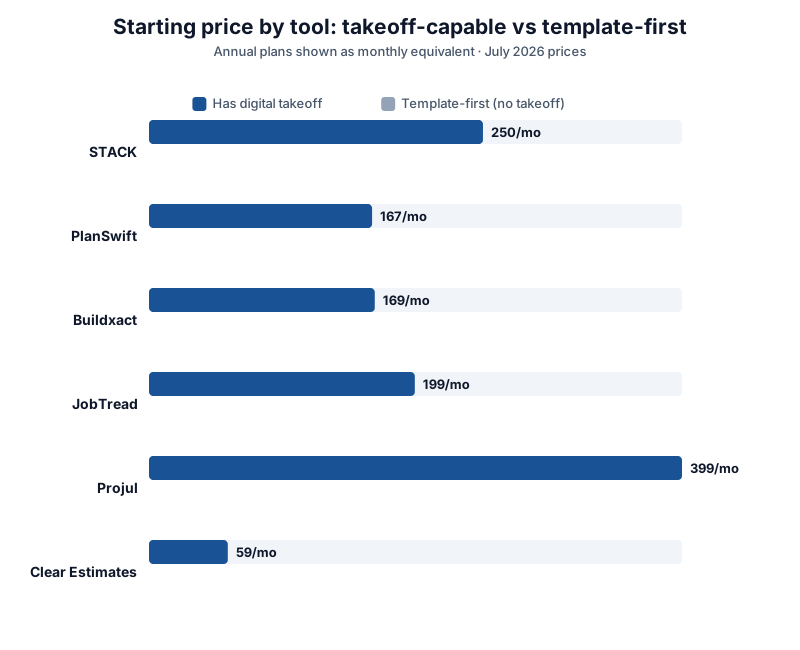
Three things stand out.
The split isn't about quality — it's about the kind of work the tool is built for. Takeoff-heavy tools (STACK, PlanSwift, ProEst) exist because counting from drawings is slow, detailed work. Estimate-first tools (Projul, Clear Estimates) skip the drawings entirely and price from templates — which is the right design for service calls and repeat work.
AI is collapsing the two steps. Buildxact's Blu assistant read the plans and produced assemblies, which is why the full estimate took 9 minutes. JobTread added a takeoff module in 2026. The line between "takeoff software" and "estimating software" is blurring fast — most tools will do both within a couple of years.
Price follows the takeoff. Every takeoff-capable tool costs more than the template-first ones. STACK runs $2,999/yr for a single seat. PlanSwift wants $2,000/yr per user. Projul and Clear Estimates price under $400/mo total — because template estimating is a simpler problem.
When You Need a Digital Takeoff (And When You Don't)
You don't need everything. Here's the decision framework we'd use:
You need digital takeoff if most of your work is:
- Bid from plans. Commercial fit-outs, GC work, plan-and-spec jobs. If blueprints arrive before the price does, counting from a PDF is where your time goes.
- Multi-page drawings. A 10-page electrical set with symbols repeated on every sheet is exactly what manual counting gets wrong.
- Repetitive counts. Outlets, fixtures, sprinkler heads, hangers. Software counts these the same way, every time, on every page.
- Bidding against the clock. When three competitors have the same drawings, the first accurate number usually wins the job.
You don't need it if most of your work is:
- Residential service and replacement. You know a 2.5-ton swap needs X hours and Y parts. Price it from a template and send it.
- Repeat work. Fifty similar decks a year means your last takeoff is your next takeoff.
- Small jobs with known scope. If the customer walked you through it and it fits on a notepad, a digital tool adds cost, not accuracy.
If you're in the second group, your money goes further on estimate software with good templates. Our take on where each tool fits lives in the best-of guides — organized by trade and crew size.
The Two Ways Contractors Get This Wrong
Mistake one: buying estimate software for plan-heavy work.
You buy a template-based estimator at $59–399/mo, then discover it can't open a blueprint. Now every plan job means printing drawings and counting by hand — two hours of highlighter work before the pricing even starts. The software didn't fail. It was built for a different kind of job.
Mistake two: buying takeoff software for template work.
You buy a dedicated takeoff tool at $2,000/yr. Then the residential service calls roll in, and it sits there. A takeoff tool on a job with no drawings is a $167/month boat anchor.
The fix costs nothing: sort your next ten jobs into two piles. Pile one needed the drawings. Pile two didn't. Buy for the bigger pile. If pile one is big and so is pile two, you're in the market for a tool that does both — that's a legitimate answer, and it's where Buildxact and JobTread land. Try STACK's free takeoff and estimate tier before you commit to anything, and compare it against Projul's 14-day free trial if templates are more your speed.
Frequently Asked Questions
Is a takeoff part of an estimate?
Yes. The takeoff is the first step inside the estimate. Quantities come first, then prices, labor, overhead, and margin stack on top. When someone says their "estimate" was off, the cause is often one step earlier — the takeoff.
What's a material takeoff vs a quantity takeoff?
Same thing, two names. Both mean counting and measuring the materials a job needs from the drawings. "Quantity takeoff" is slightly broader — it can include labor hours and equipment, not just materials.
Can estimating software do takeoffs?
Some can, some can't. In our testing, 7 of 10 tools could count from drawings — STACK, PlanSwift, ProEst, Buildxact, JobTread, and Sage among them. Projul, Clear Estimates, and BuilderTrend could not: they price from templates and manual quantity entry instead. Check before you buy, because "estimating software" describes both kinds.
How long does a takeoff take?
Depends entirely on the job. Our 12,000 sq ft commercial roof takeoff ran 34 minutes in STACK. Our 10-page electrical set ran 28 minutes in PlanSwift. The same work by hand, with printed plans and a highlighter, runs 2–3x longer — and misses more.
Do I need takeoff software if I already have estimating software?
Only if you bid from plans. If your estimates come from templates and past jobs, adding takeoff software buys you a feature you won't touch. If you're printing drawings to count by hand more than a couple of times a month, that's the signal to add it.
What does takeoff software cost?
From free (STACK's takeoff-and-estimate tier) to $2,000/yr per user (PlanSwift) to $2,999/yr for a single STACK seat, up through quote-based enterprise pricing (ProEst, Sage). Plan on more than a template-only tool costs — the takeoff capability is what you're paying for.
The Bottom Line
A takeoff counts. An estimate prices. The takeoff feeds the estimate, and errors flow downstream — which is why a missed line item costs you in the bid, not at the count.
Our verdict across 10 tools: if your work arrives as drawings, the takeoff is the bottleneck, and that's where to spend — STACK is the strongest digital takeoff in our rankings, and PlanSwift is the honest desktop alternative. If your work arrives as a phone call, skip the takeoff gear entirely and price from templates — Clear Estimates at $59/mo does that job.
Match the tool to the pile of jobs you actually get. That's the whole decision.
Prices verified as of July 2026. Tool capabilities based on vendor documentation, demos, and verified user feedback.